
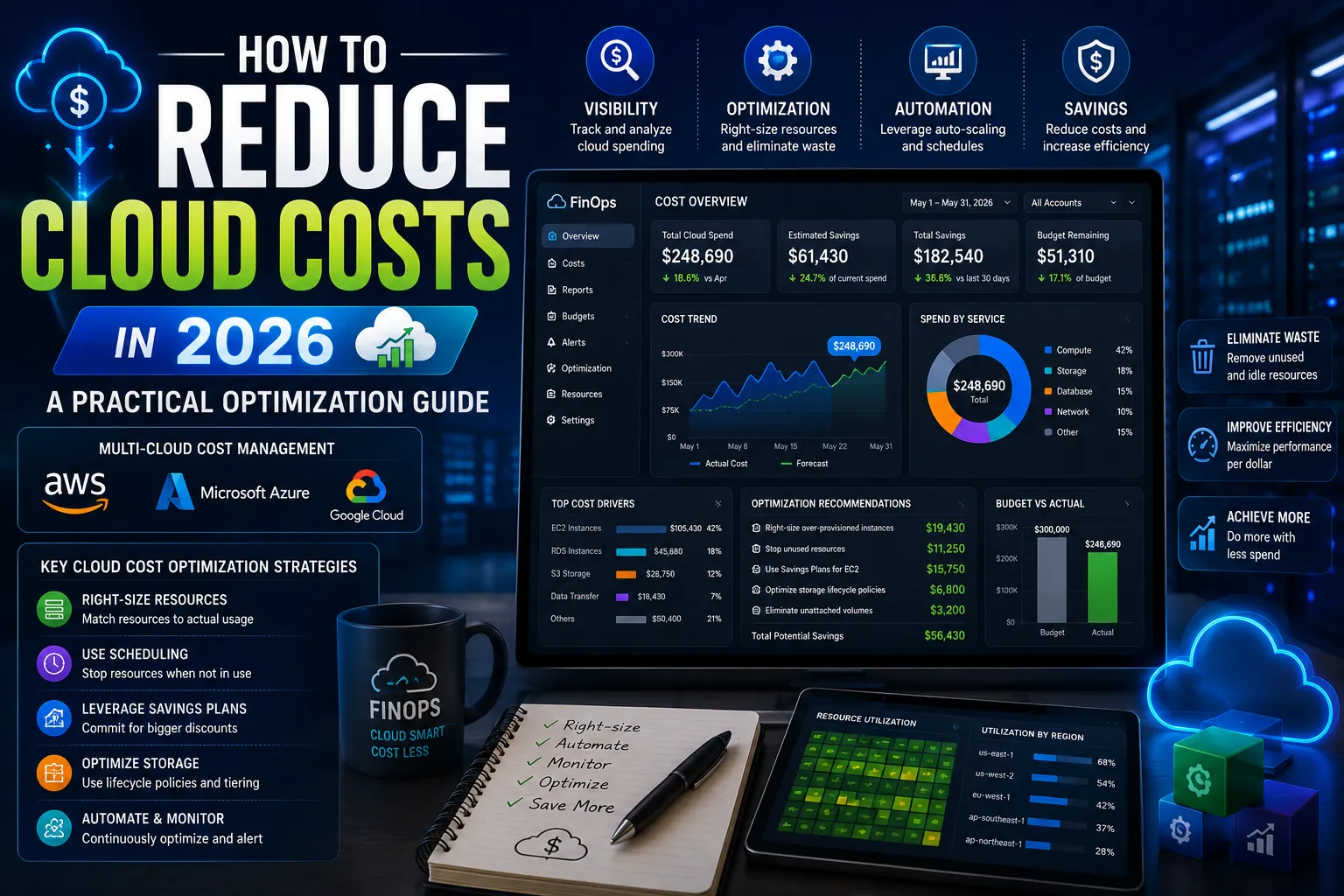
Cloud bills are one of the fastest-growing line items in IT budgets. Most engineering organizations spend 30 to 40% more on cloud infrastructure than they actually need. The waste comes from over-provisioned instances, forgotten resources, inefficient architectures, and missed savings programs. The good news: most of this waste is recoverable through systematic optimization.
This guide covers the practical cloud cost optimization playbook that works in 2026 across AWS, Google Cloud, and Azure. Each section identifies specific waste patterns and the actions that reduce them.
The 7 Highest-ROI Cloud Cost Optimization Tactics
1. Right-Size Your Instances
Most production workloads run on instances significantly larger than they need. CPU utilization below 30% across consistent hours signals an over-provisioned instance. AWS Compute Optimizer, Google Cloud Recommender, and Azure Advisor all surface right-sizing recommendations automatically based on actual usage patterns.
Typical savings: 20 to 40% on EC2, GCE, and Azure VM spend. Implementation effort: low (mostly verifying recommendations and scheduling instance type changes).
2. Use Reserved Instances and Savings Plans
On-demand compute pricing is convenient but expensive. Reserved Instances (AWS, Azure) and Committed Use Discounts (Google Cloud) reduce costs by 30 to 60% in exchange for a 1 or 3-year commitment. For workloads with predictable steady-state usage (most production systems), this is among the easiest savings available.
AWS Savings Plans add flexibility on top of Reserved Instances by applying the discount across instance families and regions. For most teams, Savings Plans are the right starting point.
3. Use Spot Instances for Fault-Tolerant Workloads
Spot instances (AWS), Preemptible VMs (GCP), and Spot VMs (Azure) provide compute at 60 to 90% discounts in exchange for accepting that the cloud provider can reclaim them on short notice. Excellent for batch processing, CI/CD builds, data pipelines, machine learning training, and any workload that tolerates interruption.
AWS Spot Fleet, EC2 Auto Scaling, and Karpenter handle the operational complexity automatically by managing spot instance lifecycles transparently.
4. Implement Aggressive Auto-Scaling
Most workloads have variable traffic patterns: high during business hours, low overnight and on weekends. Auto-scaling that scales down during low-traffic periods can reduce costs by 30 to 50% on variable workloads. Many teams configure auto-scaling once and never tune it. Quarterly reviews of scaling policies catch missed optimization opportunities.
5. Optimize Storage Tiers
Storage is often the second-largest cloud cost after compute. S3 Intelligent-Tiering, Google Cloud Storage Lifecycle Policies, and Azure Blob Storage tiers automatically move infrequently accessed data to cheaper storage classes. The savings are substantial: 50 to 80% on archive-grade data versus standard storage.
Audit storage quarterly. Identify buckets and snapshots that have not been accessed in 90+ days and apply tier transitions.
6. Delete Unused Resources
Orphaned resources are the silent cost driver in most cloud accounts. Unattached EBS volumes, idle load balancers, unused Elastic IPs, forgotten dev environments, abandoned snapshots, and stale logs accumulate continuously. Cloud Custodian, AWS Trusted Advisor, and CloudHealth catch these automatically.
A typical mid-size organization saves 5 to 15% on cloud costs through one disciplined cleanup pass.
7. Optimize Data Transfer and Egress
Egress costs (data leaving the cloud) catch many organizations off guard. A single misconfigured architecture that routes traffic between regions or across cloud providers can generate thousands of dollars per month in unnecessary egress fees. Audit traffic flow patterns. Use CloudFront, Cloudflare, or other CDNs to reduce egress charges for content delivery.
FinOps Tools That Pay for Themselves
| Tool | Best For | Approximate Cost |
|---|---|---|
| AWS Cost Explorer / Azure Cost Management / GCP Cost Tools | Built-in cost visibility | Free with provider |
| CloudHealth (VMware) | Mid-market multi-cloud cost management | Custom |
| Cloudability (Apptio) | Enterprise cloud financial management | Custom |
| Kubecost | Kubernetes cost allocation and optimization | Free tier, paid Business |
| Infracost | Pre-deployment cost estimation in CI/CD | Free tier, paid Pro |
| Vantage | Multi-cloud cost analytics, growing favorite | $0 to $1,000+/month |
Building a FinOps Culture
Cloud cost optimization is not a one-time project. It is an ongoing discipline. The teams that consistently keep cloud costs in check do four things differently.
- Assign cost ownership to teams. Tag every resource with team, project, and environment. Make cost visible to the people who can change it.
- Set monthly budgets per service. Without budgets, costs drift up gradually. With them, overruns surface immediately.
- Hold monthly cost reviews. Engineering and finance review spend together. Surprises get explained. Optimization opportunities get prioritized.
- Build cost considerations into architecture reviews. Catch expensive design decisions before they reach production.
5 Common Cloud Cost Optimization Mistakes
- Treating optimization as a one-time project. Costs drift back up within months if not actively managed.
- Optimizing on price alone without considering reliability. Aggressive cost cuts that introduce reliability risk usually cost more in incidents than they save in compute.
- Buying Reserved Instances based on hopeful projections. Buy reservations based on actual proven utilization, not future plans.
- Ignoring data transfer costs in architecture decisions. Multi-region and multi-cloud architectures can rack up egress costs unexpectedly.
- Not tagging resources consistently. Without tags, you cannot allocate costs to teams or products, which prevents accountability.
Expert Tips
- Start with the biggest line items. Compute and storage typically account for 70 to 85% of cloud spend. Focus optimization energy there first.
- Implement budget alerts. Configure budget alerts at 50%, 80%, and 100% of monthly budgets to catch overruns early.
- Use ephemeral environments for dev and test. Spin up dev environments when needed, tear them down when not.
- Audit data warehouse usage. Snowflake, BigQuery, and Redshift queries can cost thousands per month from inefficient SQL. Query optimization often pays back in days.
- Run a quarterly cost review with engineering leadership. Make cost a first-class engineering concern, not just a finance concern.
Frequently Asked Questions
How much can I realistically save on cloud costs?
Most organizations with no prior optimization effort can recover 20 to 40% of cloud spend through systematic optimization. Mature FinOps programs typically run at 5 to 10% optimization overhead (the cost of tooling and dedicated effort to keep costs efficient).
Should I hire a FinOps specialist?
For organizations spending more than $50,000/month on cloud infrastructure, a part-time or full-time FinOps focus typically pays for itself many times over. Below that, the major cloud providers’ native tools combined with quarterly reviews from engineering leadership usually suffice.
Are Reserved Instances still worth it in 2026?
Yes, for predictable workloads. AWS Savings Plans offer more flexibility than traditional Reserved Instances and remain among the easiest 30 to 60% savings available for steady-state production workloads. Avoid buying them for experimental or rapidly changing workloads.
Optimization Compounds When It Becomes a Habit
The biggest cloud cost wins come from making optimization a continuous practice rather than a one-time project. Tag resources. Set budgets. Review monthly. Right-size quarterly. Commit reservations annually. Delete unused resources continuously. Each habit alone saves modestly. Together they compound into 30 to 50% cost reduction with no impact on reliability or performance.
For the foundational view on cloud architecture, service models, and migration strategy, read our pillar: Cloud Computing in 2026: The Complete Guide. More cloud guides live on PostoryCafe.com.