
AI coding assistants moved from novelty to core developer infrastructure faster than almost any technology shift in recent memory. By 2026, over 90% of professional software developers use at least one AI coding tool daily, according to GitHub’s annual developer survey. The productivity differences between developers using AI well and those who do not are becoming impossible to ignore.
But not all AI coding assistants are equal. Different tools excel at different tasks: inline completion, full file generation, agentic refactoring, codebase understanding, or terminal-based command execution. Picking the right one for your workflow can mean the difference between minor productivity gains and a transformation in how you build software.
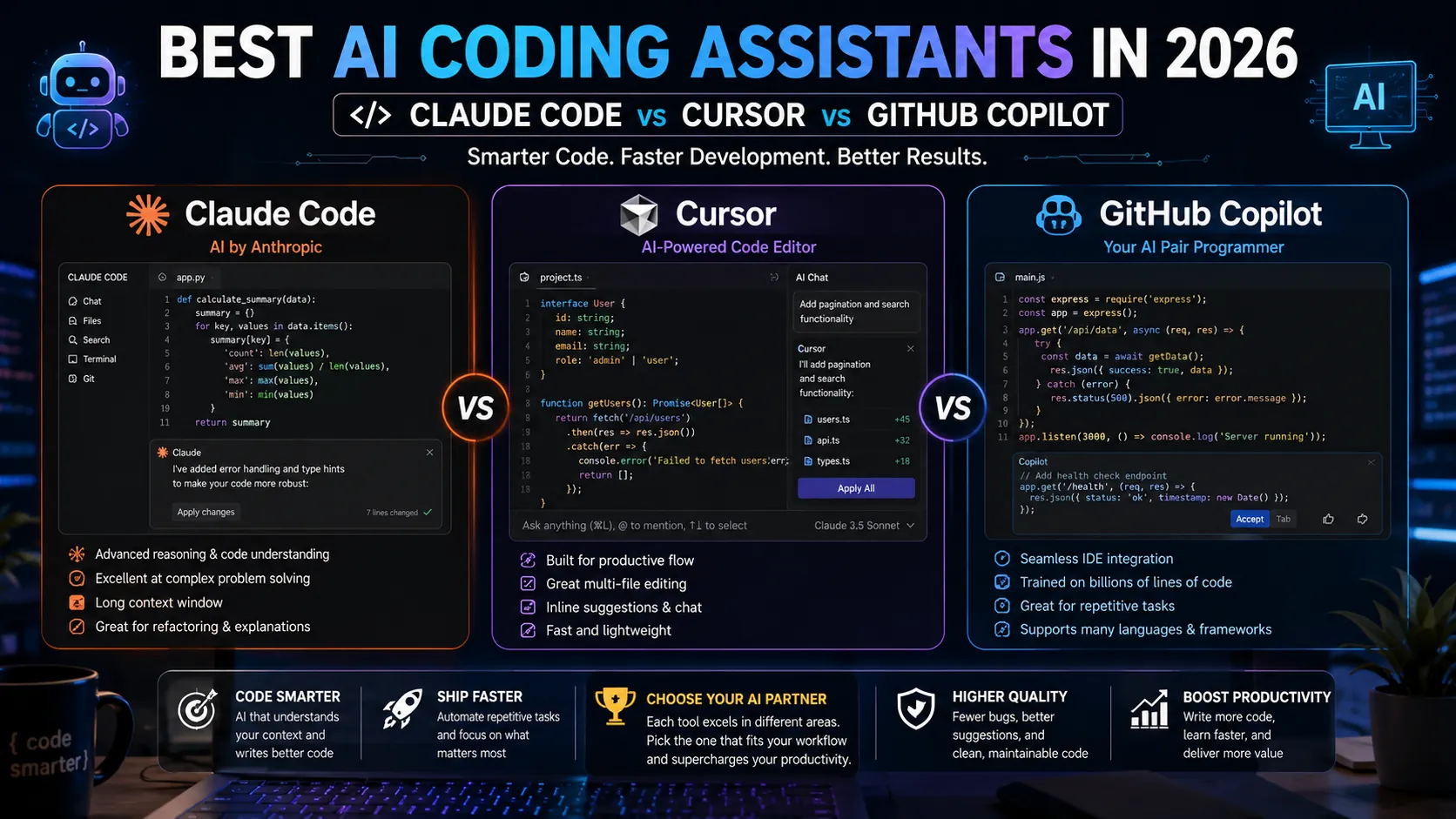
This guide compares the three leading AI coding assistants of 2026 (Claude Code, Cursor, and GitHub Copilot) along with the alternatives worth knowing. Each section is grounded in actual workflows rather than benchmark numbers.
How AI Coding Assistants Have Evolved
The first wave of AI coding tools (early Copilot, Tabnine) focused on inline completion: predicting the next few characters or lines as you type. Useful, but limited.
The second wave (Cursor, Continue, the early agentic Copilot) added chat panels and the ability to refactor whole files based on natural language instructions. The productivity gain was significant.
The third wave, dominant in 2026, is agentic. Tools like Claude Code, Cursor Agent, and GitHub Copilot Workspace work across entire codebases, understand project structure, run tests, debug failures, and complete multi-step tasks autonomously. The developer specifies an outcome, the AI executes the steps. This is a fundamentally different working model than autocomplete.
1. Claude Code: The Agentic CLI Power Tool
Claude Code is Anthropic’s command-line AI coding assistant, built around the Claude model family. It runs in the terminal, understands large codebases, executes commands, edits files, runs tests, and iterates on multi-step development tasks. In 2026, it has become the leading choice for serious software engineers working on complex projects.
Strengths
- Best-in-class agentic capability for multi-step tasks (refactor across files, fix failing tests, implement a feature from a spec).
- Native integration with VS Code, JetBrains IDEs, and Slack.
- Reads and writes files, runs commands, and chains operations the way an experienced engineer would.
- Strong on large legacy codebases where context understanding matters more than raw speed.
- Skill files (SKILL.md) let teams encode best practices the AI follows automatically.
Weaknesses
- Higher API cost for heavy users compared to subscription-based competitors.
- Requires terminal comfort. Less polished for developers who prefer entirely IDE-based workflows.
Pricing
Available with a Claude.ai Pro subscription ($20 per month) for moderate use, or via the Anthropic API for unlimited access at usage-based pricing. Many engineering teams pay $50 to $200 per developer per month for Claude Code via API depending on usage volume.
2. Cursor: The IDE Built Around AI
Cursor is a fork of VS Code rebuilt with AI as the central interaction model. Instead of bolting AI onto an existing IDE, Cursor designed the entire editor around natural language commands, multi-file edits, and AI-assisted refactoring.
Strengths
- Most polished IDE-native AI coding experience in 2026.
- Strong multi-file editing with clear diff previews before applying changes.
- Cursor Agent (their agentic mode) handles complex tasks similar to Claude Code but stays within the IDE.
- Tab autocomplete is among the fastest and most accurate available.
- Works with multiple AI models (Claude, GPT, Gemini) under the hood.
Weaknesses
- Migration friction for developers deeply customized in standard VS Code or JetBrains.
- Subscription pricing tiers can become expensive for teams with heavy usage.
- Less effective than Claude Code for very large codebases that exceed context limits.
Pricing
Free tier with limited completions. Pro plan $20 per month per user. Business plan $40 per month per user with team features and SSO.
3. GitHub Copilot: The Default Choice for Many Teams
GitHub Copilot remains the most widely deployed AI coding assistant in 2026, particularly in large enterprises that already standardize on GitHub. The product has expanded significantly beyond inline completion to include Copilot Chat, Copilot Workspace (agentic mode), and deep integration across the GitHub product family.
Strengths
- Best ecosystem fit for teams already on GitHub.
- Excellent inline autocomplete in VS Code, JetBrains, Visual Studio, and Neovim.
- Pull request review and code change explanations integrated into GitHub.com.
- Strong enterprise compliance, audit logging, and access controls.
- Multi-model support including OpenAI, Anthropic, and Google models depending on plan.
Weaknesses
- Agentic capability lags Claude Code and Cursor for complex multi-step tasks.
- Slightly less aggressive in suggestion quality compared to specialist tools.
- Heavily tied to GitHub. Less smooth for teams using GitLab or self-hosted Git.
Pricing
Individual plan $10 per month or $100 per year. Business plan $19 per month per user. Enterprise plan $39 per month per user with advanced compliance and admin features.
Head-to-Head Comparison
| Factor | Claude Code | Cursor | GitHub Copilot |
|---|---|---|---|
| Primary interface | Terminal CLI + IDE plugin | Custom IDE (VS Code fork) | IDE plugin + GitHub.com |
| Inline autocomplete | Good (via plugin) | Best | Excellent |
| Agentic multi-step tasks | Best | Strong | Improving (Workspace) |
| Large codebase understanding | Best | Good | Good |
| Multi-file editing | Excellent | Best | Good |
| Test execution | Native | Yes | Limited |
| Multi-model support | Claude family | Claude, GPT, Gemini | OpenAI, Anthropic, Google |
| IDE flexibility | Any IDE + terminal | Cursor only | VS Code, JetBrains, Visual Studio, Neovim |
| Best for | Senior engineers, complex codebases | Greenfield work, startups | Enterprise teams on GitHub |
| Starting price | $20/mo (with API extras) | $20/mo | $10/mo |
Honorable Mentions
- Continue.dev: open-source AI coding assistant for VS Code and JetBrains. Strong for teams that want to self-host or use models other than the major three providers.
- Codeium / Windsurf: strong free tier for individual developers. Windsurf (their flagship IDE) is a Cursor competitor.
- Aider: open-source CLI agentic assistant. Limited compared to Claude Code but free.
- Tabnine: focused on enterprise privacy with on-premises and air-gapped deployment options.
Which Should You Choose?
- Choose Claude Code if: you work on complex codebases, refactor frequently, or value agentic multi-step task execution. Senior engineers consistently report the highest productivity gains here.
- Choose Cursor if: you want the most polished AI-first IDE experience and you are willing to switch from your existing editor.
- Choose GitHub Copilot if: your team is already on GitHub, you need strong enterprise compliance features, or you want the simplest path to AI-assisted coding.
Many serious developers in 2026 use multiple tools. A common pattern: GitHub Copilot for fast inline completion, Claude Code for complex agentic tasks, and Cursor for projects where they specifically want the AI-first IDE experience.
5 Common AI Coding Mistakes
- Accepting AI suggestions without reading them. AI tools produce confident-sounding wrong code regularly. Every suggestion deserves a read before acceptance.
- Using AI for cryptography or security-critical code without expert review. AI assistants frequently generate subtle security flaws (hardcoded keys, weak hashing, vulnerable patterns) that look plausible but should never reach production.
- Letting AI degrade your understanding of the codebase. Developers who delegate too much without reviewing or learning lose context that matters for debugging and architectural decisions.
- Skipping tests because AI wrote it. AI-generated code passes the syntax check, not the correctness check. Always run tests on AI-generated code.
- Ignoring data privacy when using consumer AI tools on company code. Enterprise plans (Copilot Business, Cursor Business, Anthropic API) handle data with stricter protections. Consumer tiers often do not.
Expert Tips
- Build a SKILL.md or CLAUDE.md file in your repo. Project-level instructions teach the AI your conventions, libraries, and patterns. The output quality improvement is dramatic.
- Use AI for boilerplate and tests, not for critical logic. AI excels at scaffolding and test cases. Reserve human judgment for security-critical and architectural code.
- Treat the AI like a junior engineer. Give it context, review its output, ask it to explain decisions, and reject what does not meet the bar.
- Track time savings honestly. Subjective productivity improvement and actual time saved often differ. Measure throughput on real tasks before and after AI tool adoption.
Frequently Asked Questions
Which AI coding assistant is the most accurate?
Accuracy depends on the task type. For complex multi-file refactoring and codebase understanding, Claude Code consistently produces the highest-quality output in 2026. For inline autocomplete speed and accuracy, GitHub Copilot and Cursor are competitive at the top. Independent benchmarks (SWE-bench, HumanEval) confirm that Anthropic’s Claude models lead in most software engineering benchmarks, which directly benefits Claude Code users.
Are AI coding assistants safe for production code?
Yes, when used with proper review. AI-generated code should go through the same code review, testing, and security analysis as human-written code. Treat AI as a productivity multiplier for an experienced developer, not as a replacement for engineering judgment. Enterprise-tier plans from all major providers offer code privacy guarantees and audit logging suitable for production work.
Can I use AI coding assistants for free?
Yes, several have meaningful free tiers in 2026. Cursor offers a free tier with limited completions. Codeium has a strong free plan for individuals. GitHub Copilot is free for verified open-source contributors and students. For occasional use, free tiers cover most needs. For full-time professional use, paid plans deliver enough additional value to justify the cost.
Pick the Tool That Fits Your Work
AI coding assistants in 2026 are no longer experimental. They are standard infrastructure for serious software development. The choice between Claude Code, Cursor, and GitHub Copilot comes down to your codebase complexity, IDE preferences, ecosystem, and how much agentic capability you actually need.
For the broader picture on AI productivity tools across writing, meetings, design, and project management, read our pillar: Top 15 AI Productivity Tools Transforming Remote Work in 2026. More AI tool guides live on PostoryCafe.com.