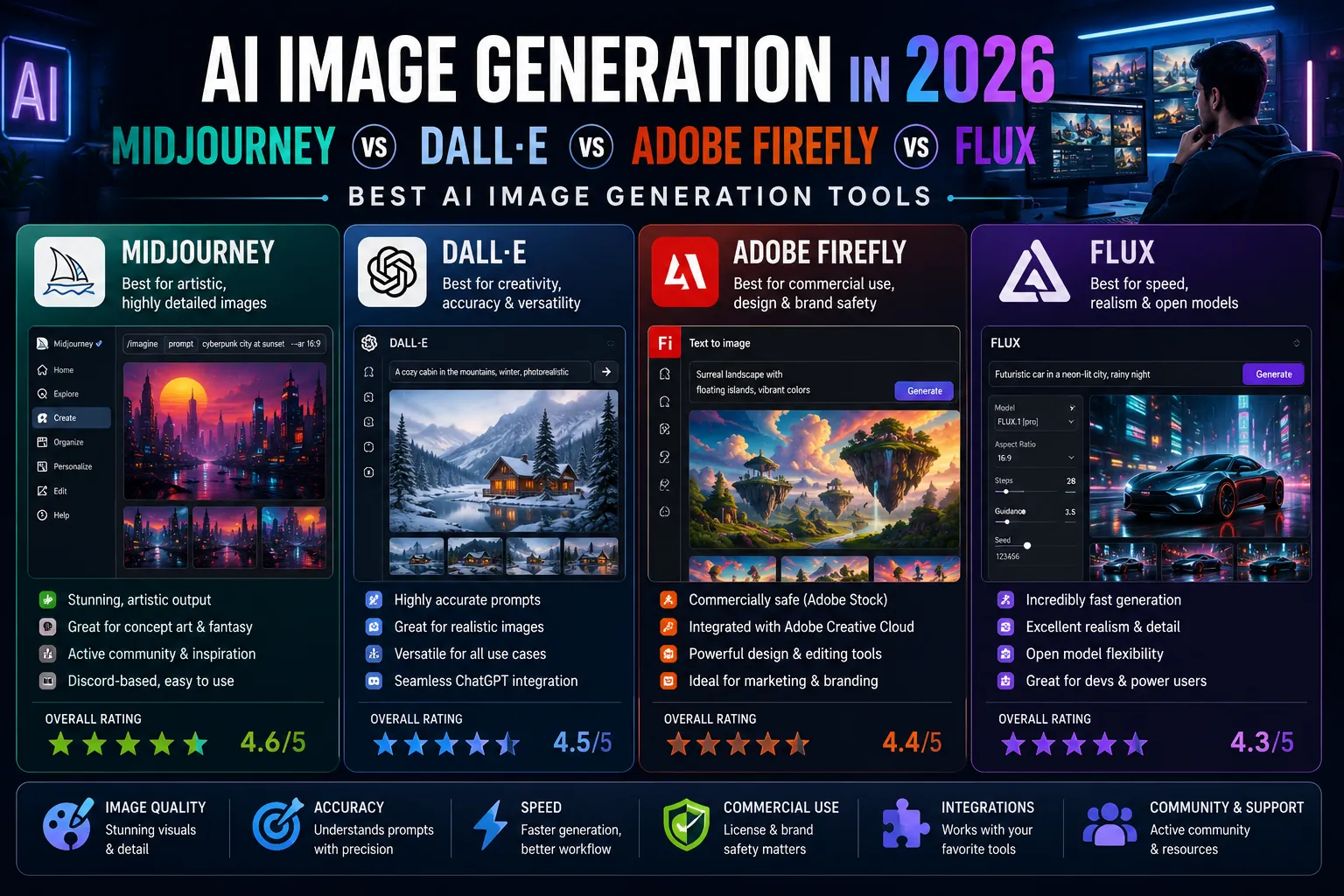
AI image generation has become standard infrastructure for marketing teams, content creators, designers, and product managers in 2026. What was a novelty in 2022 is now embedded in daily creative workflows, replacing some stock photography purchases entirely and supplementing custom illustration in others.
But the major image generation tools have diverged significantly in their strengths, pricing, and ideal use cases. Midjourney still leads on artistic quality but lacks integration. DALL-E inside ChatGPT is the most accessible. Adobe Firefly leads in commercial safety. Flux from Black Forest Labs has emerged as the open-weight standard. Picking the right tool for your specific work matters more than ever.
This guide compares the four most relevant AI image generators of 2026 across quality, speed, commercial use, integrations, and pricing. By the end, you will know exactly which tool fits each part of your creative workflow.
How AI Image Generation Has Evolved
In 2022, AI image generators produced occasionally striking but often broken images: extra fingers, fused faces, unreadable text. By 2024, the major models had largely solved hands and faces. By 2026, the leading tools generate photorealistic, brand-consistent, text-accurate images at production quality with proper prompting.
Three shifts define the 2026 landscape. First, commercial licensing has been clarified with most tools now offering enterprise indemnification. Second, image-to-image and inpainting (editing existing images) have replaced pure text-to-image in many workflows. Third, integration with creative tools (Adobe, Canva, Figma) has made AI image generation a routine part of design rather than a separate workflow.
1. Midjourney: The Artistic Leader
Midjourney remains the leader in artistic quality and aesthetic style. Version 7 (released in late 2025) significantly improved consistency, prompt accuracy, and photorealism. For marketing imagery, concept art, social media visuals, and any case where the image is intended to feel polished and intentional, Midjourney is still the most consistently impressive output among the major tools.
Strengths
- Best aesthetic quality and artistic flexibility among major models.
- Strong style consistency across a series of generations.
- Active community sharing prompts and techniques.
- Web app launched in 2024 removed the previous Discord-only barrier.
Weaknesses
- No free tier in 2026 (free trial replaced by limited-credit free explorations).
- Commercial licensing requires the Pro plan ($60+ per month).
- Less polished for editing existing images than DALL-E or Firefly.
- No native API for developers (third-party APIs exist but unofficial).
Pricing
Basic $10 per month (limited generations). Standard $30 per month (unlimited relaxed). Pro $60 per month (commercial use, fast hours). Mega $120 per month (heavy production use).
Best for: marketing imagery, concept art, social content, anywhere style and aesthetic quality matter most.
2. DALL-E (Inside ChatGPT and Sora)
OpenAI’s DALL-E (now integrated into ChatGPT and the Sora video product) remains the most accessible AI image generator in 2026 because it is bundled with ChatGPT subscriptions used by tens of millions of people daily. Quality has improved significantly since the original DALL-E launch, and the conversational interface makes iteration fast.
Strengths
- Bundled with ChatGPT Plus and Pro subscriptions (no separate purchase).
- Conversational refinement makes iteration natural.
- Strong text rendering inside images compared to older tools.
- Available through the OpenAI API for developer integrations.
- Strong commercial usage rights for ChatGPT Plus and above.
Weaknesses
- Aesthetic quality consistently behind Midjourney and Flux Pro.
- Strict content moderation occasionally blocks reasonable creative work.
- Less granular control over composition and style than Midjourney.
Pricing
Included in ChatGPT Plus ($20 per month) and Pro ($200 per month). Pay-per-image API pricing for developers.
Best for: quick image needs inside an existing ChatGPT workflow, conversational iteration, integration into AI-powered apps.
3. Adobe Firefly: The Commercial Safety Champion
Adobe Firefly differentiates on commercial safety and integration. The model was trained on Adobe Stock content with proper licensing, which means Firefly outputs come with full commercial indemnification (Adobe will defend you against IP claims). This has made it the default choice for enterprise marketing teams that cannot tolerate legal risk.
Strengths
- Full IP indemnification for enterprise users (Adobe defends you in claims).
- Native integration with Photoshop, Illustrator, Express, and Premiere.
- Generative Fill in Photoshop is the most refined inpainting workflow available.
- Reasonable pricing, especially when bundled with Creative Cloud.
Weaknesses
- Aesthetic ceiling lower than Midjourney for purely artistic work.
- Style range narrower because of more conservative training data.
- Best value requires a Creative Cloud subscription, which is expensive without other Adobe usage.
Pricing
Standalone Firefly Standard $9.99 per month. Firefly Pro $29.99 per month. Included in Creative Cloud All Apps ($59.99 per month).
Best for: enterprise marketing, brand-safe commercial work, anyone already using Adobe Creative Cloud.
4. Flux (by Black Forest Labs): The Open-Weight Leader
Flux from Black Forest Labs (the team behind the original Stable Diffusion) emerged in 2024 as the leading open-weight image model and has continued to improve. Flux Pro 1.1 (released early 2026) competes directly with Midjourney on quality while offering API access and self-hosting options the proprietary tools do not.
Strengths
- Top-tier image quality, often matching Midjourney for photorealism.
- Open-weight model means it can be self-hosted or used through many providers.
- Strong API access through Replicate, fal.ai, Together AI, and others.
- Schnell tier offers near-instant generation (1 to 2 seconds per image).
- Commercial licensing terms are clearer than some competitors.
Weaknesses
- No polished consumer app, primarily accessed through API or third-party UIs.
- Less integrated into mainstream creative tools than Adobe Firefly.
- Self-hosting requires GPU infrastructure for production use.
Pricing
Pay-per-image API pricing through providers (typically $0.01 to $0.05 per image). Self-hosted requires GPU costs but no per-image fees. Some third-party UI providers offer subscription plans starting at $10 to $20 per month.
Best for: developers building image generation into apps, technical users wanting control and lower costs at high volume, teams needing self-hosting.
Honorable Mentions
- Stable Diffusion 3.5 / SDXL Lightning: still relevant for self-hosters and budget-conscious users. Less polished than Flux but completely free.
- Ideogram: strong specifically for text rendering inside images and typography-heavy designs.
- Recraft: vector graphics and brand-style consistent generation.
- Imagen 3 (Google): integrated into Google’s product suite, strong photorealism.
Side-by-Side Comparison
| Factor | Midjourney | DALL-E | Adobe Firefly | Flux |
|---|---|---|---|---|
| Aesthetic quality | Best | Good | Good | Excellent |
| Photorealism | Excellent | Good | Strong | Best |
| Text in images | Improved | Strong | Strong | Excellent |
| Commercial use | Pro plan needed | Plus and above | Full indemnification | Provider-dependent |
| Integration with creative tools | Limited | ChatGPT only | Best (Adobe stack) | Developer-focused |
| API availability | Limited (third-party) | Yes (OpenAI) | Yes (Adobe) | Yes (multiple providers) |
| Speed | Moderate | Moderate | Moderate | Very fast (Schnell tier) |
| Starting price | $10/mo | $20/mo (with ChatGPT) | $9.99/mo | $0.01/image API |
Which Should You Use?
- Choose Midjourney if: aesthetic quality is the priority, you create marketing visuals or social content, and you want the strongest creative ceiling.
- Choose DALL-E if: you already pay for ChatGPT Plus and want image generation as part of an existing AI workflow, or if conversational iteration matters.
- Choose Adobe Firefly if: you work in enterprise marketing where IP indemnification matters, or if you already pay for Adobe Creative Cloud.
- Choose Flux if: you are building image generation into an app, need API access at scale, or want the strongest quality-per-dollar at production volumes.
Many serious creative teams in 2026 use multiple tools: Midjourney for hero imagery and concept work, Firefly for in-Photoshop edits, and Flux for high-volume API workflows. Specializing per tool produces better results than forcing one tool to do every job.
Common AI Image Generation Mistakes
- Vague prompts. “A nice photo of a coffee shop” produces generic output. Specific, detailed prompts (“morning light through large windows of a Brooklyn coffee shop, ceramic mugs, warm cream tones, photorealistic”) produce dramatically better results.
- Skipping the iteration step. First generations are rarely the best. Refining 3 to 5 times based on what works in early generations is standard for production work.
- Ignoring commercial licensing terms. Free tiers often disallow commercial use. Always check the license before using AI-generated images in marketing or paid client work.
- Generating images of real people without consent. Legal and ethical risks are significant. Use AI image generation for hypothetical, abstract, or non-identifiable subjects rather than depicting real individuals.
- Not editing AI output before publishing. AI generations often have subtle artifacts that look obvious to viewers. A few minutes of cleanup in Photoshop or Affinity makes the difference between professional and amateur output.
Expert Tips
- Build a prompt library. Save the prompts that consistently produce strong results for your brand. Reuse and iterate on them rather than starting fresh each time.
- Use reference images when possible. Image-to-image generation with a reference dramatically improves consistency for marketing series.
- Generate at the highest quality your tool allows, then upscale. Rendering and post-processing on the original generation produces better results than upscaling from a low-resolution source.
- Disclose AI use where appropriate. For journalism, scientific publications, and certain industries, transparency about AI-generated visuals is required and increasingly expected by audiences.
- Treat AI-generated images like first drafts. They are starting points, not final assets. Photoshop or Affinity cleanup on every important image elevates the result significantly.
Frequently Asked Questions
Which AI image generator is the best in 2026?
Midjourney still leads in pure aesthetic quality. Adobe Firefly leads in commercial safety with full IP indemnification. Flux leads in photorealism and developer access. DALL-E leads in accessibility for users already on ChatGPT. The best choice depends on your specific use case more than overall ranking.
Can I use AI-generated images commercially?
It depends on the tool and tier. Adobe Firefly offers full IP indemnification and is the safest commercial choice. Midjourney Pro and Mega plans include commercial rights. ChatGPT Plus and above include commercial usage rights for DALL-E. Flux licensing varies by provider. Always confirm commercial terms before using AI images in paid client work or commercial campaigns.
Are AI-generated images copyrightable?
In the US, the Copyright Office has held that purely AI-generated images are not copyrightable because they lack human authorship. However, images with substantial human creative contribution (specific prompting, editing, composition decisions) may qualify for copyright protection on the human-contributed elements. Practical advice: edit AI outputs meaningfully before claiming copyright, and consult an IP attorney for high-stakes commercial work.
How much do AI image generation tools cost?
Entry-level plans start at around $10 per month for Midjourney Basic and Adobe Firefly Standard. ChatGPT Plus at $20 per month includes DALL-E. Flux through API providers costs $0.01 to $0.05 per image. For most individual creators, $20 to $40 per month covers professional use. Heavy commercial users typically spend $60 to $150 per month across multiple tools.
Pick the Tools That Fit Your Work
AI image generation is no longer a novelty in 2026. It is standard infrastructure for marketing, content creation, and product design. The major tools have diverged enough that picking the right one for each job produces dramatically better results than forcing a single tool to do everything.
For the broader picture on AI productivity tools across writing, meetings, design, coding, and project management, read our pillar: Top 15 AI Productivity Tools Transforming Remote Work in 2026. More AI tool comparisons live on PostoryCafe.com.