
The antivirus market looks different in 2026 than it did five years ago. Traditional signature-based detection, which worked by matching malware against a database of known threats, now plays a supporting role to behavior monitoring, machine learning-based anomaly detection, and cloud-backed sandboxing. Modern endpoint protection identifies threats it has never seen before by watching what software is doing rather than what it looks like.
For consumers and small businesses, this progress creates a simpler choice: Windows Defender has become genuinely capable, which raises the bar for paid products to justify their cost. The paid options that belong on this list earn their place through higher detection rates, bundled features, or cross-platform coverage that the built-in solution cannot match.
Do You Still Need Antivirus Software in 2026?
For Windows users, the honest answer is: it depends. Windows Defender (now Microsoft Defender) provides real protection that independent testing labs score competitively with many paid products. For a careful Windows user with automatic updates enabled, MFA on accounts, a password manager, and sensible browsing habits, Defender alone is a reasonable choice.
The case for a paid product rests on three factors: higher detection rates for zero-day and novel threats, bundled features you actually need (unlimited VPN, identity theft monitoring, cloud backup), and cross-platform coverage for households where everyone uses different devices.
For Mac users, the case for third-party protection has strengthened. macOS built-in security (Gatekeeper, XProtect) is meaningful but not comprehensive. Targeted Mac malware campaigns have grown 40% year-over-year since 2023. A lightweight paid option adds real protection without slowing an Apple Silicon device.
How We Evaluated These Products
This comparison uses independent testing lab data from AV-Test (Germany), SE Labs (UK), and AV-Comparatives (Austria), each of which runs rigorous monthly and quarterly tests on real-world malware samples. Lab scores are the most objective data available. We also factor in real-world features, system performance impact, privacy policies, and pricing transparency.
1. Bitdefender: The Detection Rate Leader
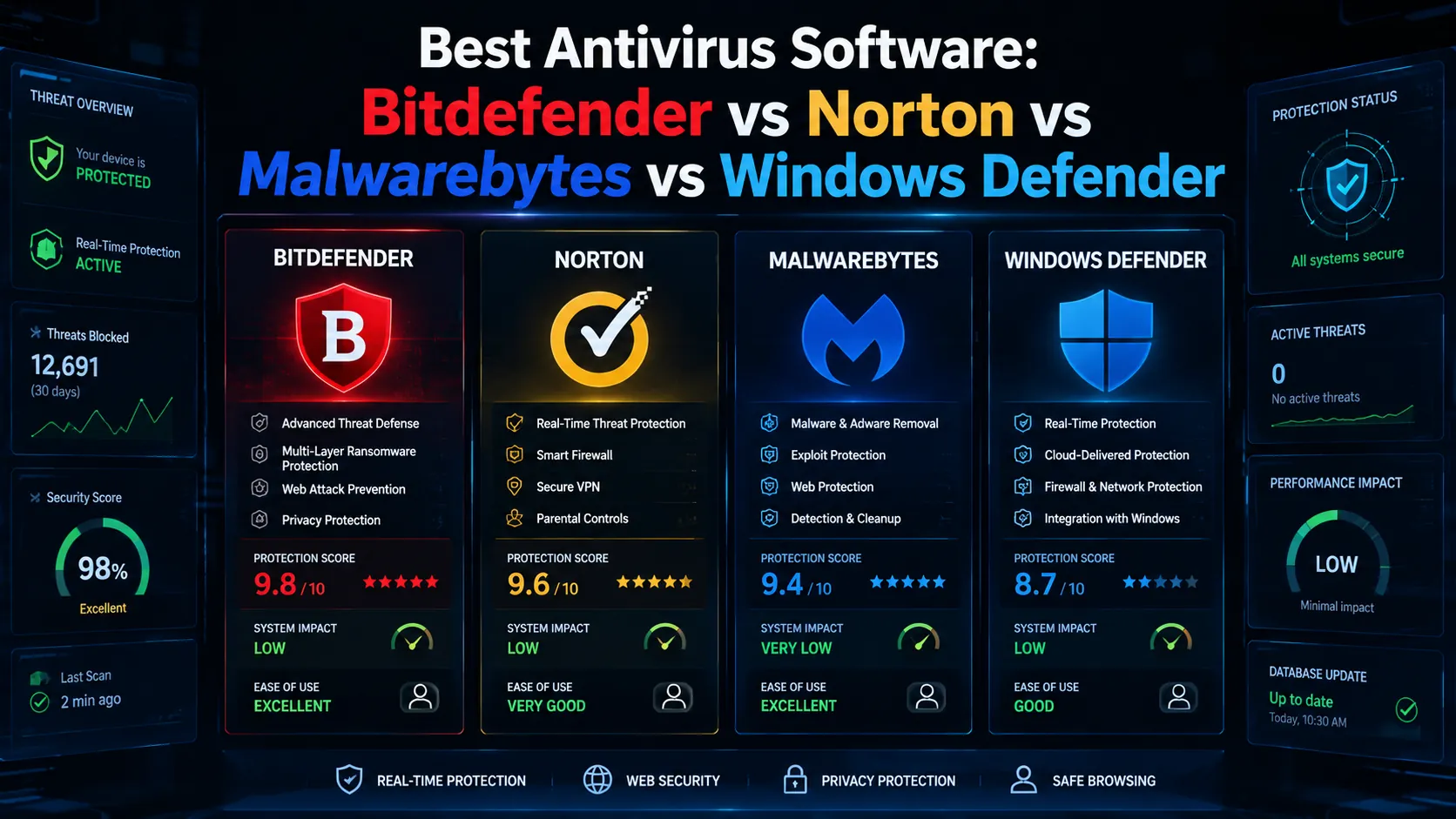
Bitdefender earns the highest detection rates in independent lab testing year after year. Its multi-layer protection architecture combines signature scanning, behavioral analysis, network traffic monitoring, and cloud-assisted threat intelligence. The result is consistently near-perfect scores against both known malware and novel zero-day threats.
Strengths
- Top detection rates across AV-Test, AV-Comparatives, and SE Labs in every 2025 and 2026 testing cycle.
- Very low system performance impact. Independent tests show CPU and memory usage well below average for background protection tasks.
- Ransomware remediation feature that backs up files before they are modified and rolls back changes if ransomware behavior is detected.
- Advanced Threat Defense module blocks fileless attacks, script-based malware, and obfuscated threats that bypass traditional scanners.
- Cross-platform: Windows, macOS, iOS, Android, all under one subscription.
Weaknesses
- VPN included with Total Security tier has a 200 MB daily cap per device (upgrade to Premium Security for unlimited).
- The full feature set can feel overwhelming for non-technical users unfamiliar with security concepts.
Pricing (2026)
Antivirus Plus (1 device) from $29.99 per year. Total Security (5 devices, Windows/Mac/Android/iOS) from $49.99 per year. Premium Security with unlimited VPN from $79.99 per year.
Best for: users who prioritize the highest detection rates and lightest system impact.
2. Norton 360: The Best All-In-One Suite
Norton 360 bundles antivirus protection with an unlimited VPN, dark web monitoring, identity theft insurance, a password manager, and up to 50 GB of cloud backup into a single subscription. For families or users who want maximum coverage from one vendor without managing separate subscriptions, it offers the most comprehensive protection package in the category.
Strengths
- Unlimited VPN data included from the Deluxe plan upward, no daily cap.
- Most comprehensive identity theft protection in the consumer security category, including real human support for restoration.
- Strong detection rates in independent lab testing, competitive with Bitdefender.
- Parental controls and family dashboard included in family plans.
- Cloud backup with up to 50 GB storage, which adds real ransomware resilience.
Weaknesses
- Promotional first-year pricing is significantly lower than renewal rates. Set a calendar reminder to re-evaluate at renewal time.
- Higher CPU usage during scans than Bitdefender.
- Some bundled tools (password manager, backup) are functional but not class-leading compared to dedicated apps.
Pricing (2026)
Standard (1 device) from $39.99 per year. Deluxe (5 devices, unlimited VPN) from $49.99 per year. Select with LifeLock (identity theft protection) from $99.99 per year.
Best for: households that want maximum protection coverage in a single subscription including identity theft and unlimited VPN.
3. Malwarebytes: The Specialist
Malwarebytes built its reputation removing infections that other products missed. In 2026, its Premium tier functions as a full real-time antivirus. It remains particularly strong against adware, spyware, browser hijackers, potentially unwanted programs (PUPs), and zero-day exploits. Security professionals often run it alongside another product as a second-opinion scanner.
Strengths
- Best-in-class detection of adware, spyware, browser hijackers, and PUPs that traditional antivirus tools often fail to flag.
- Clean, fast interface with minimal friction.
- Free tier for on-demand scanning, which remains one of the most useful free security tools available.
- Browser Guard extension blocks malicious and deceptive websites in real time across Chrome, Firefox, Edge, and Safari.
- Strong community and professional reputation among security researchers.
Weaknesses
- Real-time protection requires the paid Premium tier.
- No bundled VPN, identity monitoring, or cloud backup.
- Detection rates for traditional malware are slightly behind Bitdefender in independent testing.
Pricing (2026)
Free on-demand scanner (no real-time protection). Premium from $44.99 per year (1 device). Teams pricing available for small businesses.
Best for: users who want specialist-level adware and PUP protection, or who want a second-opinion scanner alongside another product.
4. Windows Defender: The Free Baseline
Microsoft Defender, integrated into Windows Security Center, is no longer the weak product it was before 2017. AV-Test regularly gives it scores competitive with paid products for standard malware detection. For a single Windows device with careful user habits and consistent updates, it is a legitimate choice in 2026.
Strengths
- Free, pre-installed, automatically updated with Windows Update.
- Native OS integration means no compatibility conflicts or additional performance overhead.
- Competitive detection rates for common malware families.
- No subscription management, renewal fees, or upsell pressure.
Weaknesses
- Windows only. No protection for Mac, Android, or iOS devices.
- No bundled VPN, dark web monitoring, identity protection, or cloud backup.
- Weaker performance against novel zero-day threats and ransomware rollback compared to paid options.
Best for: cautious single-device Windows users who practice safe browsing, keep software updated, and do not need cross-platform or identity protection features.
Head-to-Head Comparison
| Factor | Bitdefender | Norton 360 | Malwarebytes | Windows Defender |
|---|---|---|---|---|
| Detection rate (lab scores) | Highest | High | High (PUPs: best) | Good |
| System performance impact | Light | Moderate | Light | Light |
| VPN included | Limited (200MB/day) | Unlimited (Deluxe+) | No | No |
| Identity theft protection | Moderate | Best in class | No | No |
| Password manager | Yes | Yes (basic) | No | No |
| Cloud backup | No | Yes (up to 50 GB) | No | No |
| Mac support | Yes | Yes | Yes | No |
| Price per year (1 device) | $29.99 | $39.99 | $44.99 | Free |
| Best for | Performance + detection | All-in-one families | PUPs + second opinion | Single Windows device |
5 Common Antivirus Mistakes
- Running two real-time protection products simultaneously. Two active scanners create conflicts and degrade performance. Run one primary product with real-time protection; add Malwarebytes for on-demand scans only.
- Trusting antivirus as your only protection layer. Endpoint protection is one layer. It does not replace MFA, strong unique passwords, software updates, or careful browsing habits.
- Ignoring renewal pricing. Most antivirus products offer deep first-year discounts and charge significantly more on renewal. Evaluate alternatives at renewal time rather than auto-renewing.
- Not protecting mobile devices. Smartphones are high-value attack targets. Bitdefender Mobile, Norton 360 Mobile, and Malwarebytes for Android offer meaningful protection.
- Buying features you will not use. If you already have a dedicated VPN, password manager, and cloud backup, paying for an antivirus suite that bundles all three creates redundancy rather than value.
Expert Tips
- Use independent lab scores as your primary decision filter. Marketing claims from antivirus vendors are not comparable across products. AV-Test and AV-Comparatives data is.
- Enable automatic quarantine, not automatic deletion. Automatic quarantine lets you recover false positives. Automatic deletion of flagged files occasionally removes legitimate programs with no recovery option.
- Exclude large files or directories you trust from scheduled scans. Large media libraries and trusted development directories slow scans without security benefit once you have confirmed they are clean.
- Check your product’s privacy policy. Some antivirus products collect browsing data, file hashes, or behavioral telemetry. Understand what data is collected before installing on a device with sensitive work files.
Frequently Asked Questions
Is Windows Defender good enough in 2026?
For a single Windows device with good habits, yes. For a household with multiple device types (Mac, Android, iPhone), users who want identity theft monitoring or VPN bundled, or anyone who wants the highest possible detection rates against novel zero-day threats, a paid product adds real value that Defender does not provide.
Does a Mac need antivirus?
Yes. macOS built-in protections have real limitations and targeted Mac malware has grown significantly since 2023. Bitdefender for Mac and Malwarebytes for Mac are both lightweight, effective, and do not noticeably impact Apple Silicon performance. The investment is small relative to the risk.
Is Bitdefender better than Norton?
Bitdefender consistently scores higher in independent detection rate testing and has lighter system impact. Norton 360 offers a more complete bundle with unlimited VPN and superior identity theft protection. Choose Bitdefender for pure protection performance. Choose Norton if the bundled features (unlimited VPN, identity monitoring, cloud backup) match things you would pay for separately anyway.
Pick One and Keep It Updated
Endpoint protection is one layer of a healthy security posture. Pick the product that fits your device ecosystem, threat profile, and budget, configure automatic updates and automatic scans, and treat it as baseline protection that works alongside strong passwords, MFA, and careful browsing habits.
For the complete guide to cybersecurity threats, phishing defenses, and business security stacks, read our pillar: Cybersecurity Threats in 2026: The Complete Guide. More security guides live on PostoryCafe.com.