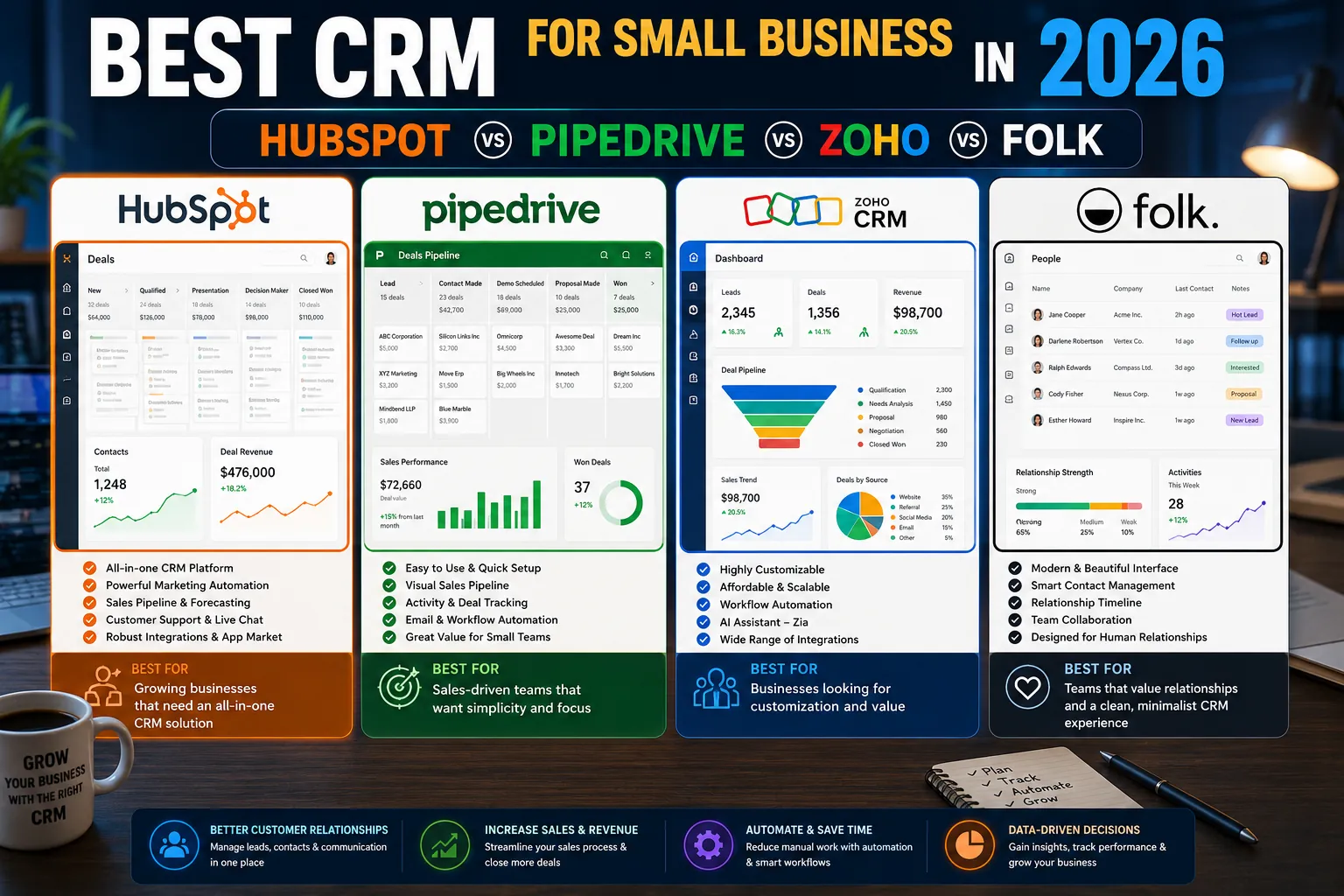
A CRM is one of the highest-leverage software investments a small business can make. The right CRM tracks every customer interaction, surfaces follow-ups before they fall through the cracks, and reveals which marketing and sales activities actually generate revenue. The wrong CRM becomes expensive shelfware that nobody updates.
The CRM landscape in 2026 has matured significantly. AI integration is now standard. Pricing models have stratified. The differences between leading platforms come down to use case, team size, and ecosystem fit. This guide covers the top choices for small businesses with practical evaluation criteria.
What to Look For in a Small Business CRM
- Easy adoption. A CRM nobody uses is worthless. Speed of onboarding matters more than feature count.
- Email integration. Automatic sync with Gmail or Outlook is essential.
- Deal pipeline visualization. Drag-and-drop pipelines that match how your team works.
- Contact enrichment. Auto-populate company info, job titles, social profiles.
- Reporting that drives decisions. Surface what is working without requiring a data analyst.
- AI assistance. Email drafting, follow-up reminders, summary generation.
- Integrations. Connections to email marketing, accounting, calendar tools.
1. HubSpot CRM: The Most Popular Choice
HubSpot is the most widely used CRM among small and mid-market businesses in 2026. The free tier is genuinely useful and the upgrade path scales smoothly into Marketing Hub, Sales Hub, and Service Hub.
Strengths
- Generous free tier covers core CRM needs.
- Best-in-class email integration with Gmail and Outlook.
- Built-in marketing automation and email marketing.
- Strong AI features for email drafting and summary generation.
- Massive ecosystem of integrations.
Weaknesses
- Pricing scales steeply once you exceed free tier limits.
- Marketing Hub features can feel overwhelming for small teams.
Pricing
Free CRM with unlimited contacts. Starter plans from $20/month per seat. Professional from $90/month per seat.
2. Pipedrive: The Sales-First CRM
Pipedrive is built around sales pipeline visualization. It is the favorite of sales-led small businesses where deal management is the primary use case.
Strengths
- Intuitive drag-and-drop pipeline interface.
- Strong activity tracking and follow-up automation.
- Reasonable pricing across all tiers.
- AI-powered sales assistant for next best action recommendations.
Weaknesses
- Marketing automation features are weaker than HubSpot.
- Customization options are more limited than enterprise CRMs.
Pricing
Essential plan from $14/month per seat. Advanced from $34/month. Professional from $59/month.
3. Zoho CRM: The Value Leader
Zoho is the value leader among feature-rich CRMs in 2026. It offers most of what HubSpot offers at a fraction of the cost, with the trade-off of a slightly less polished interface.
Strengths
- Lowest cost among full-featured CRMs.
- Deep integration with Zoho ecosystem (Books, Mail, Projects, Desk).
- Strong customization and workflow automation.
- AI assistant Zia handles lead scoring, anomaly detection, and email sentiment.
Weaknesses
- Interface less polished than HubSpot or Pipedrive.
- Customer support quality varies.
Pricing
Standard from $14/month per seat. Professional from $23/month. Enterprise from $40/month.
4. Folk: The Relationship CRM
Folk is the rising star CRM for relationship-led businesses (agencies, consultants, founders, deal-makers). It treats your network as the core asset rather than the sales pipeline.
Strengths
- Modern interface designed for relationship management.
- Strong AI-powered enrichment and outreach features.
- LinkedIn and email integration that feels native.
- Excellent fit for solo founders, agencies, and investors.
Weaknesses
- Less suited for traditional B2B sales pipeline workflows.
- Smaller integration ecosystem than HubSpot or Zoho.
Pricing
Standard from $20/month per seat. Premium from $40/month. Custom enterprise tiers available.
Comparison Table
| CRM | Best For | Free Tier | Starting Price |
|---|---|---|---|
| HubSpot CRM | All-in-one growing teams | Yes (strong) | $20/seat/mo |
| Pipedrive | Sales-led small businesses | No (14-day trial) | $14/seat/mo |
| Zoho CRM | Value-conscious feature seekers | Yes (3 users) | $14/seat/mo |
| Folk | Relationship-led businesses | Free trial | $20/seat/mo |
Which CRM Should You Choose?
- HubSpot if: you want one platform for CRM, marketing, and sales and plan to grow into the broader Hub ecosystem.
- Pipedrive if: sales pipeline management is your primary use case and you want simplicity over breadth.
- Zoho if: you want maximum features at minimum cost, especially if you already use other Zoho products.
- Folk if: you are a founder, agency, or relationship-driven business where your network is the core asset.
5 Common CRM Mistakes
- Choosing based on feature lists. A CRM with 200 features you never use is worse than one with 50 features your team actually adopts.
- Skipping the data migration. Importing clean data from your existing system matters more than the new CRM’s features.
- No defined sales process. A CRM tracks your process. If you have not defined the process, no CRM will fix that.
- Letting it become a dumping ground. Without discipline, CRMs accumulate stale contacts. Quarterly hygiene matters.
- Buying enterprise features at small business scale. A 5-person team rarely needs Salesforce. Start with the right size tool.
Expert Tips
- Start with the free tier first. Most CRMs offer real free tiers. Use them for 60 days before paying.
- Standardize deal stages with your team. Inconsistent stage definitions across reps make pipeline reports meaningless.
- Connect email and calendar from day one. This is what makes a CRM useful in daily work.
- Schedule weekly pipeline reviews. A CRM that gets reviewed weekly stays clean. One that does not becomes shelfware.
Frequently Asked Questions
What is the best CRM for a small team?
For all-in-one needs, HubSpot. For pure sales pipeline, Pipedrive. For value, Zoho. For relationship-driven work, Folk. Most small teams pick HubSpot or Pipedrive based on whether marketing automation matters.
Is a free CRM good enough for small business?
For very small teams (1 to 5 users), HubSpot Free and Zoho Free are genuinely capable. As the team grows past 10 users or you need advanced automation, paid tiers become worth the cost.
How long does CRM implementation take?
1 to 2 weeks for a small team starting fresh. 4 to 8 weeks for a team migrating with significant data. Enterprise implementations: 3 to 6 months.
The Right CRM Is the One Your Team Uses
A CRM is only as valuable as the discipline around it. Pick the tool that fits your size, sales process, and existing stack. Adopt it consistently. Review it weekly. Within 90 days, you will have visibility into your business that no spreadsheet could provide.
For the broader picture on marketing automation, workflows, and platform selection, read our pillar: Marketing Automation in 2026: A Complete Guide. More guides live on PostoryCafe.com.